Privacy Mode
Beekeeper Studio provides a Privacy Mode that hides sensitive data when you're sharing your screen, so you can keep private information private.
Interaction
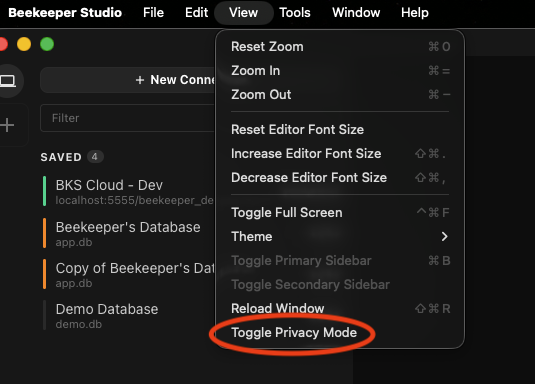
Go to View in the app menu and select the option to Toggle Privacy Mode.
What Gets Hidden?
Privacy Mode hides some fields that might be considered as sensitive:
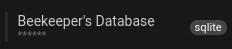
- Host / Port / DB in Saved Connections
- Pop-up with the full URL on Hover
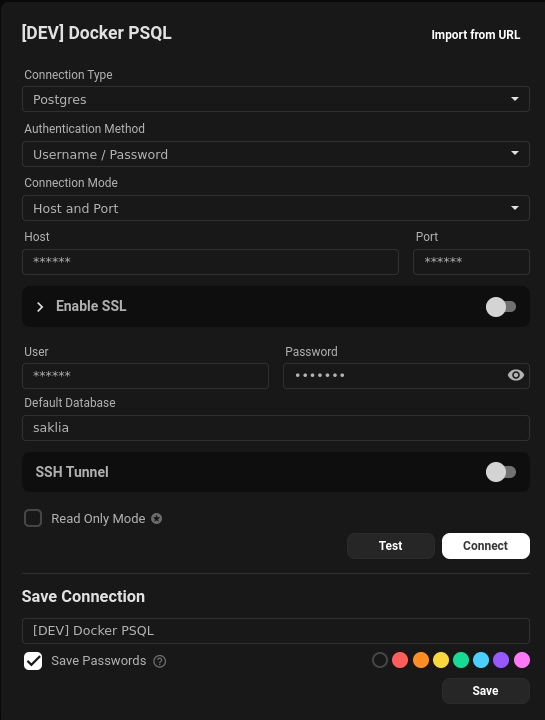
- Host / Port / DB in Connection Settings
- URL when hovering over the DB name after connecting
| Hidden Host / Port / DB in Saved Connections | The pop-up with the full URL on Hover |
|---|---|
 |
 |
| Fig.3 - Hidden Feature 1 | Fig.4 - Hidden Feature 2 |
| Host / Port / DB in Connection Settings | URL when hovering over the DB name after connecting |
|---|---|
 |
 |
| Fig.5 - Hidden Feature 3 | Fig.6 - Hidden Feature 4 |