Migrating from PopSQL
Export queries from PopSQL
PopSQL offers a GitHub two way sync that will sync your queries to a repository.
- Create a new GitHub repo
- Go to your PopSQL settings and connect your GitHub repository
- PopSQL will sync your queries as .sql files and preserve your directory structure
- Clone the repository to your machine.
Import queries into Beekeeper Studio
- In Beekeeper, connect to any connection in the workspace you would like your queries to reside (your local workspace is only accessible to you, you can also import to a Team Workspace to share with your coworkers)
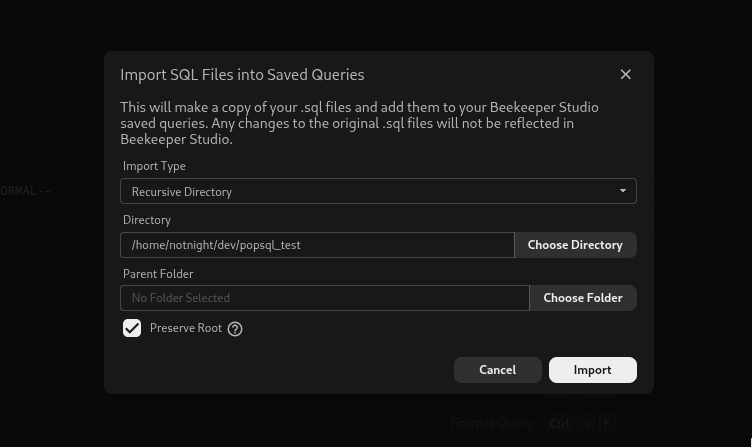
- Go to
File > Import Saved Queriesto open the import modal - Select the
Recursive Directoryimport type - Select the directory of your cloned repository that we set up above
- Configure the Parent folder and whether or not you would like to keep the root directory
- Import!
Connections
PopSQL does not currently have the ability to export connections. You will have to manually transfer over your connection details.